How Instagram, WhatsApp, Uber & Netflix Would Be Structured Today Using Expo Router

Hello folks! 👋
Most React Native applications usually start with a structure that looks something like this:
src/
 ├── screens/
 ├── components/
 └── navigation/
And honestly?
There's nothing wrong with it.
For small applications, this structure works perfectly.
Maybe you have:
5 screens
10 screens
a couple of reusable components
Everything feels organized and easy to manage.
But what happens when the application starts growing?
Imagine:
100+ screens
40 developers
10-15 feature teams
Millions of users
Now let's take it one step further.
Imagine building the next:
Instagram
WhatsApp
Uber
Netflix
As users grow and business requirements evolve, suddenly you start dealing with:
hundreds of screens
dozens of API integrations
authentication flows
realtime systems
caching layers
offline support
multiple development teams
At this scale, architecture becomes more important than individual screens.
The question is no longer:
"How do I build this screen?"
Instead, it becomes:
"How do I organize this application, so it remains maintainable two years from now?"
And that's where modern architectural thinking starts.
Thinking in Features Instead of Screens
A common beginner approach is grouping files by their type:
components/
screens/
hooks/
services/
This works well initially.
But as applications grow, developers often spend more time searching for related files than actually building features.
Modern applications tend to organize code around business domains instead.
For example:
app/
 ├── (auth)/
 ├── (tabs)/
 │
 ├── feed/
 ├── messages/
 ├── profile/
 ├── notifications/
 │
 ├── shared/
 ├── services/
 └── store/
Notice the difference.
Instead of organizing by technical implementation, we're organizing by business capability.
Everything related to the feed lives together.
Everything related to messaging lives together.
Everything related to profiles lives together.
This makes scaling much easier when multiple teams work on different parts of the application simultaneously.
Expo Router as the Navigation Foundation
One of the reasons Expo Router has become popular is that it naturally encourages this feature-oriented structure.
Instead of maintaining large navigation configuration files, routes are generated from the file system.
For example:
app/
 ├── home.tsx
 ├── profile.tsx
 └── settings.tsx
automatically creates:
/
/profile
/settings
No manual screen registration required.
A few useful conventions include:
home.tsx or index.tsx: Creates a route.
(auth): Creates a route group used for organization without affecting the URL structure.
[ticketId].tsx: Creates a dynamic route.
Example:
/orders/123
/orders/456
Both can be handled using a single file.
Shared layouts can also be created using:
_layout.tsx
which allows entire sections of the application to share navigation, headers, authentication checks, and UI structure.
This becomes extremely powerful as applications start growing beyond a handful of screens.
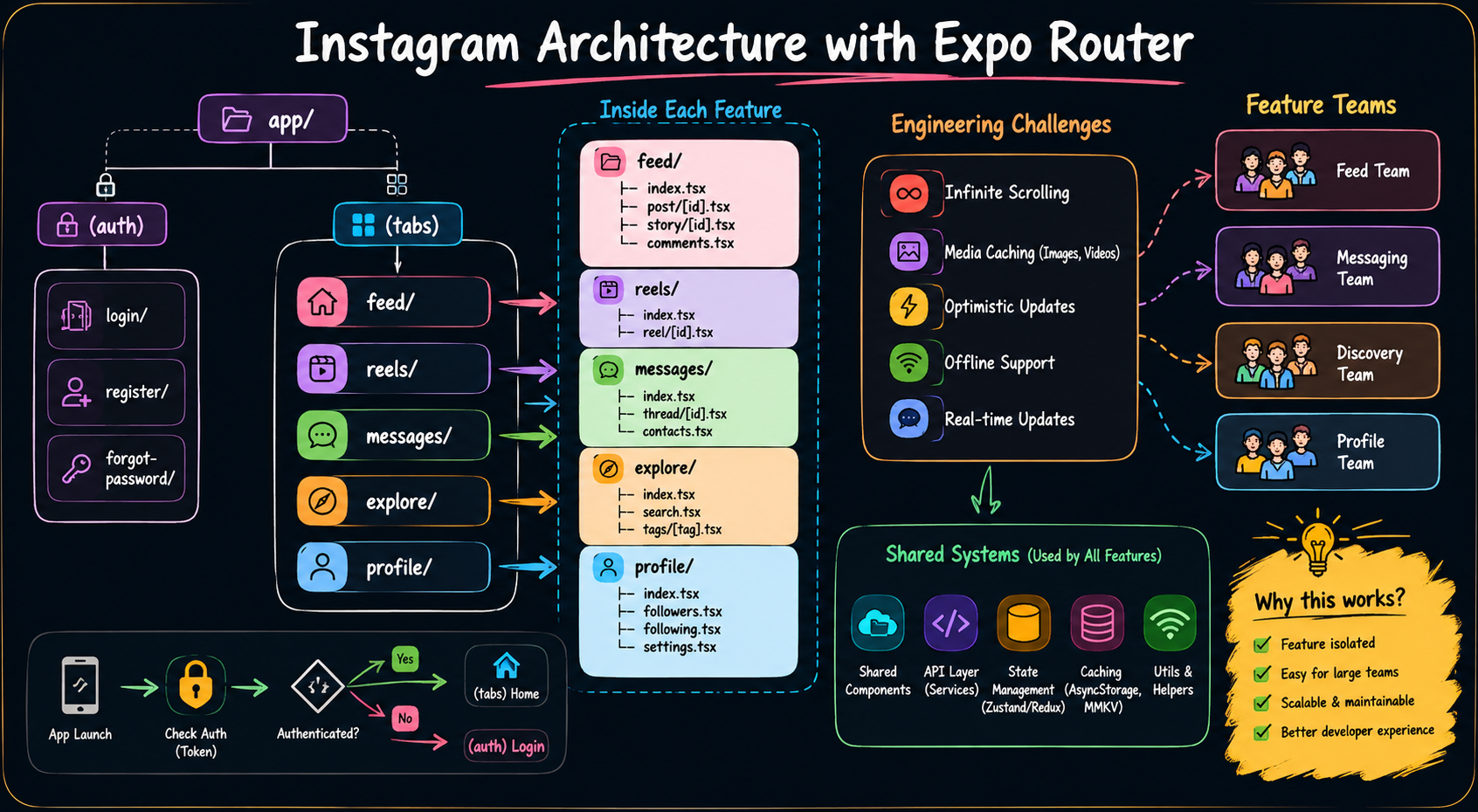
Instagram: More Than Just Screens
At first glance, Instagram looks like a collection of screens:
Home Feed
Reels
Explore
Messages
Profile
But the real engineering challenges aren't the screens themselves.
They're the systems behind them.
For example:
Infinite scrolling feeds
Media caching
Optimistic updates for likes and comments
Offline viewing
Real-time notifications
A scalable architecture allows each feature team to work independently while still sharing common systems like networking, caching, and state management.
WhatsApp: The Realtime Challenge
If Instagram is a content-heavy application, WhatsApp is a Realtime-heavy application.
A possible Expo Router structure might look like:
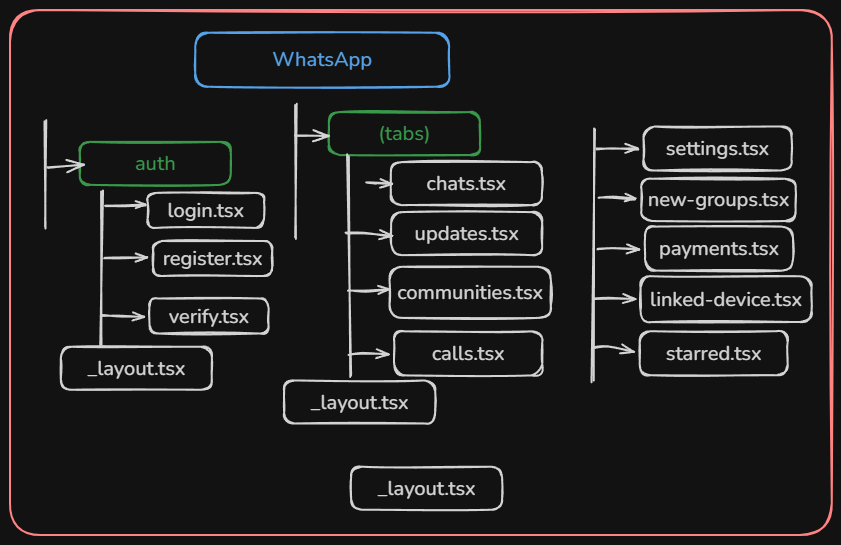
But the real challenge isn't navigation.
It's keeping millions of conversations synchronized in real time.
Whenever a message is sent:
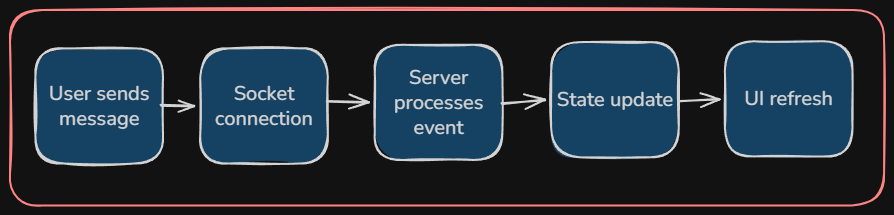
Architecturally, WhatsApp relies heavily on:
Realtime communication
local persistence
message synchronization
offline-first support
The folder structure helps organize the application, but the Realtime systems are what make the app truly complex.
Uber: Live Systems Everywhere
Uber introduces a completely different problem.
Unlike Instagram or WhatsApp, the application state changes continuously.
Driver locations move.
Routes update.
ETA calculations change.
Ride status changes.
A possible structure might look like:
app/
 ├── ride/
 ├── maps/
 ├── payments/
 ├── profile/
 └── support/
The challenge here becomes:
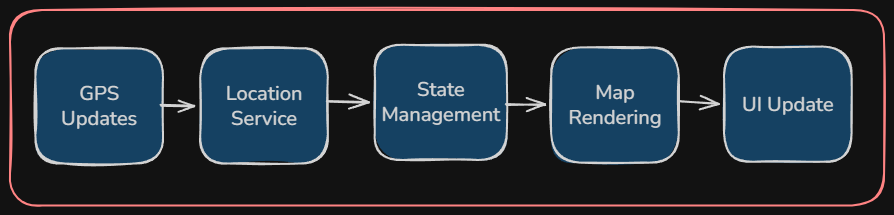
At this scale, performance becomes extremely important because location updates happen constantly.
Netflix: Content at Scale
Netflix appears simple:
Home
Search
Watchlist
Profile
But the engineering challenge is content delivery.
A possible structure might look like:
app/
 ├── home/
 ├── search/
 ├── watchlist/
 ├── profile/
 └── downloads/
The focus shifts toward:
lazy loading
image optimization
startup performance
content caching
offline downloads
A user should feel like content appears instantly, even though thousands of assets are being loaded behind the scenes.
Then after these four examples, move into the common patterns.
What All These Applications Have in Common
Even though Instagram, WhatsApp, Uber, and Netflix solve very different problems, their architecture often shares similar building blocks.
A simplified view looks something like this:
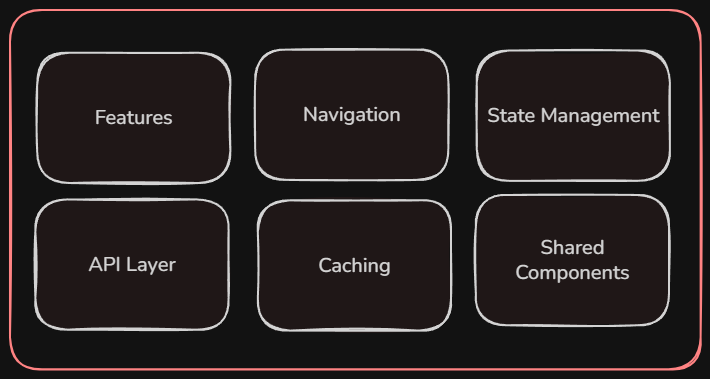
Most large applications eventually introduce:
Authentication flows
Global state management
Networking layers
Offline caching
Shared design systems
Not because they're trendy, but because they help teams maintain applications as complexity grows.
For example:
Instagram focuses heavily on media caching and feed performance.
WhatsApp relies on real-time synchronization and local persistence.
Uber depends on live location updates and frequent state changes.
Netflix optimizes content loading and startup performance.
The implementation details may differ, but the architectural thinking remains surprisingly similar.
And this is where Expo Router fits into the picture.
Expo Router doesn't solve Realtime messaging.
It doesn't solve media caching.
It doesn't solve ride tracking.
What it does provide is a scalable navigation foundation that helps organize these systems as applications grow.
The Real Takeaway
When we look at applications like Instagram, WhatsApp, Uber, or Netflix, it's easy to focus on the UI.
But the real challenge isn't building screens.
It's organizing hundreds of screens, dozens of features, multiple teams, and years of future development.
That's why modern mobile applications increasingly adopt:
Feature-based architecture
Clear navigation boundaries
Shared systems
Modular design
Expo Router naturally complements this style by encouraging structure through the file system.
The biggest lesson isn't:
"Use Expo Router."
The bigger lesson is:
"Think about architecture before complexity forces you to."
Because small apps focus on screens.
Large apps focus on systems.
Comments
Join the discussionNo comments yet. Be the first to comment.

