How Instagram Stores Reels, Photos, and Drafts Behind the Scenes
Hello folks! 👋
Imagine you're recording the perfect Reel.
You spend 10 minutes:
recording clips
adding music
applying filters
trimming the timeline
Everything looks great.
But suddenly you realize:
"I don't want to post this yet."
So, you tap: "Save as Draft"
You close the app.
Maybe you even restart your phone.
A few hours later, you open Instagram again and...
✨ Your draft is still there.
Exactly where you left it.
No missing edits. No missing music. No missing clips.
But wait...
Where was that Reel actually stored?
On your phone?
On Instagram's servers?
Somewhere in the cloud?
Let's pull back the curtain and understand how modern social media apps handle photos, videos, drafts, and millions of uploads every day.
The Journey Starts on Your Device
A common misconception is:
"The moment I record a Reel, Instagram uploads everything."
Not really.
In fact, the media journey begins entirely on your phone.
A simplified flow looks like:
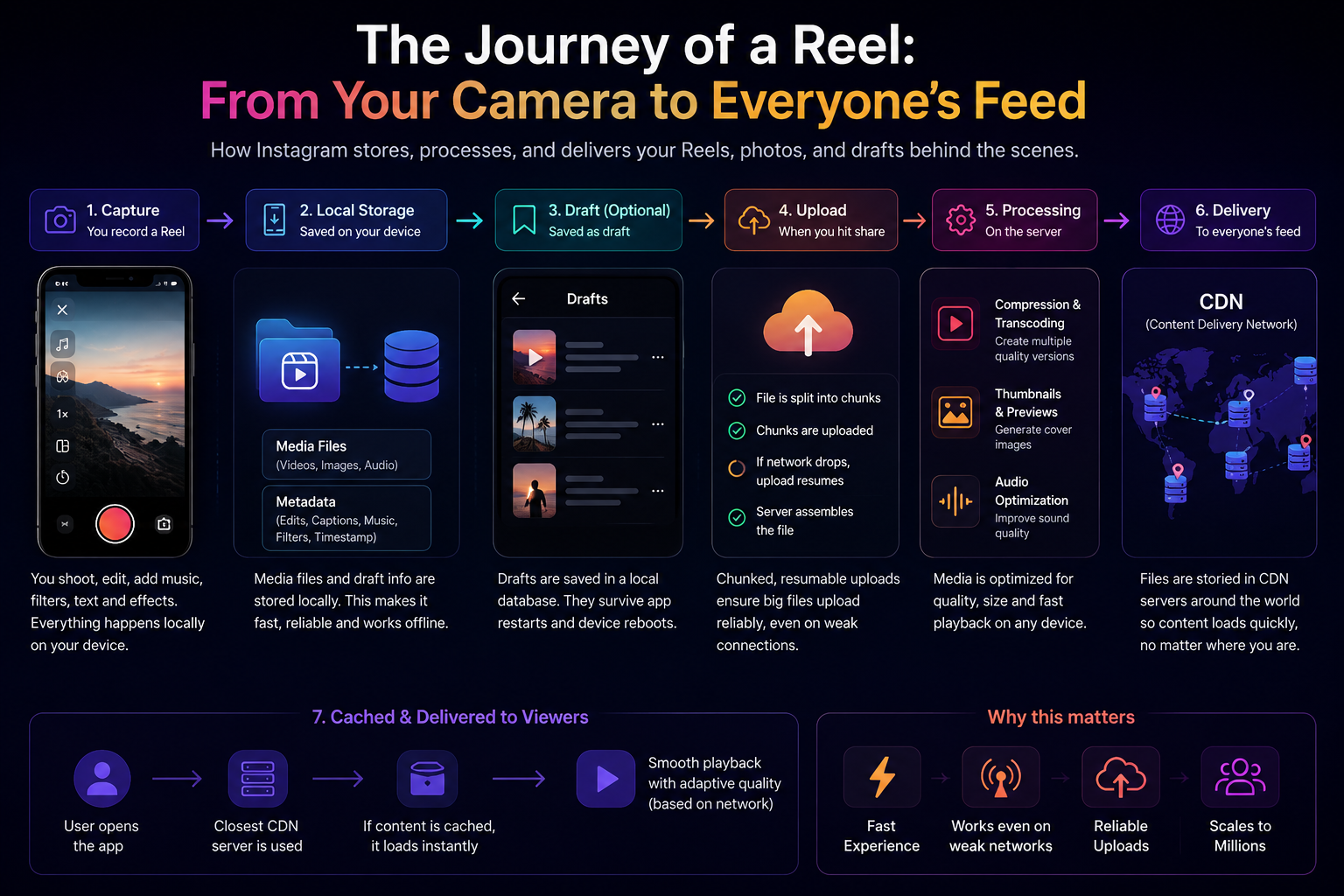
Notice something interesting.
The cloud doesn't appear immediately.
Your phone is the first stop.
Why Store Media Locally First?
Imagine recording a video inside a tunnel.
Or while traveling on a flight.
If Instagram depended entirely on the internet:
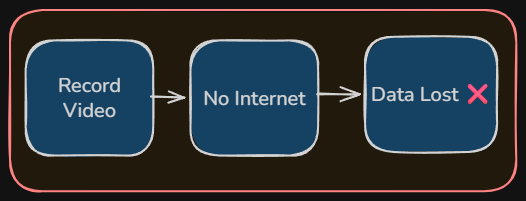
That would be a terrible user experience.
Instead, the app saves media locally first.
Benefits include:
instant saving
offline support
faster editing
reduced upload failures
This is why recording and editing usually feel smooth even without perfect connectivity.
What Happens When You Save a Draft?
When you tap: "Save as Draft" the app doesn't just save a video.
It saves two things:
1. The Media Files
Video
Audio
Images
These are stored locally on your device.
2. Draft Information
Caption
Music Selection
Filters
Trim Settings
Timestamp
This information is much smaller and helps reconstruct the draft later.
Think of it like:
Draft
 ├── Media Files
 └── Metadata
The next time you open the app, it combines both pieces and restores your draft.
That's why drafts survive:
app restarts
phone reboots
temporary network loss
Local Storage vs Cloud Storage
At some point, media needs to leave your device.
Otherwise, nobody else can see it.
A simple comparison:
| Local Storage | Cloud Storage |
|---|---|
| Lives on your phone | Lives on remote servers |
| Fast access | Global access |
| Works offline | Requires internet |
| Limited space | Massive scalability |
A Reel usually starts here:
Phone
and eventually ends up here:
Cloud Infrastructure
once you're ready to publish.
Uploading Large Videos Efficiently
Uploading a photo is easy.
Uploading a 100 MB Reel?
Not so easy 😄
Imagine reaching 95% upload progress and losing internet.
Starting again from 0% would be painful.
Modern systems solve this using:
Chunked Uploads
Instead of:
100 MB
the file becomes:
5 MB
5 MB
5 MB
5 MB
...
If the connection drops:
Chunk 1 ✅
Chunk 2 ✅
Chunk 3 ❌
the app only retries the failed part.
This makes uploads far more reliable.
Compression & Media Processing
The video you record is usually much larger than the video people eventually watch.
Before distribution, platforms often:
compress videos
resize images
generate multiple quality versions
The goal is simple:
Keep quality high while reducing file size.
This improves:
loading speed
storage costs
user experience
Thumbnail Generation
Ever noticed how Instagram instantly shows previews?
Those aren't the full videos.
The system creates:
Video
   ↓
Thumbnail
   ↓
Preview Image
These lightweight previews load much faster than the actual media.
Which makes the app feel responsive.
Why Reels Load So Quickly
Let's say a Reel goes viral.
Millions of users start watching it.
Fetching every video from one central server would be slow.
This is where CDNs come into play.
A simplified view:
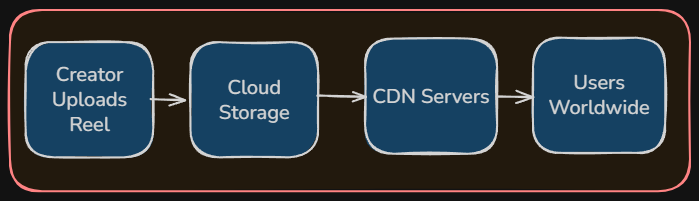
Instead of traveling across the globe every time, content is delivered from a nearby location.
This reduces:
latency
buffering
load times
Caching Frequently Viewed Content
Have you ever noticed a Reel load instantly the second time you watch it?
That's often because of caching.
A simplified flow:
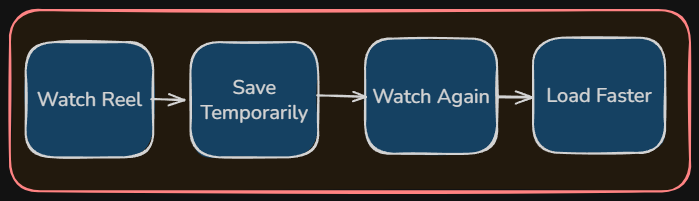
Caching helps reduce:
network requests
loading times
data usage
And it makes the application feel much faster.
The Engineering Trade-Off
Building a media-heavy app is a balancing act.
Too much caching:
Fast App ✅
More Storage Usage ❌
Too little caching:
Less Storage Usage ✅
More Loading ❌
Similarly:
larger videos improve quality
smaller videos improve speed
Engineering teams constantly balance these trade-offs.
Conclusion
The next time you save a Reel draft, remember:
The app isn't simply storing a video.
Behind the scenes it is:
saving media locally
preserving draft metadata
compressing uploads
generating previews
distributing content globally
caching frequently viewed media
All of this happens so users can enjoy a simple experience:
Record. Save. Upload. Watch.
While the complexity stays hidden behind the scenes.
Comments
Join the discussionNo comments yet. Be the first to comment.


